Cut "Reading Time" by 90% with AI | A Time-Saving Manual for Instant Summaries of Reports and Meeting Minutes
Tired of drowning in meeting minutes and long emails? This article explains 3 ways to use AI to instantly extract key points from business docs into bullet points. Drastically reduce research time and create a space to focus on high-value "thinking work."


In today's era of information overload, is your day ending just as you finish "reading"?
Between a flood of daily emails, Slack notifications, and lengthy meeting minutes or reports, isn't most of your time as a professional consumed just by inputting information—that is, the act of "reading"?
Business Professionals Face Three Main "Reading" Challenges
- Lack of time:
Searching for key points in long documents takes too long and often leads to overtime. - Risk of missing info:
Failing to read through everything leads to overlooking critical decisions or tasks assigned to you. - Summarization burden:
Spending even more time creating summary documents to share what you’ve read with your boss or team.
These issues don't just lower individual productivity; they are a major factor in slowing down an entire organization's decision-making speed. By reading this article, you will learn how to use AI to solve these problems at their root, free yourself from the "reading" grind, and shift your time toward higher-value "thinking" work.
AI Becomes Your "Dedicated Research Assistant"
To solve these information processing challenges, mitsumonoAI offers three powerful summarization features tailored to different situations. It feels like having an ultra-fast research assistant team by your side that perfectly understands your intent.
- Text Summarization Workflow:
Simply copy and paste text from emails or chats to generate high-quality summaries in your preferred format (e.g., bullet points). - File Analysis Assistant PRO:
You can hand over entire PDF or Word reports. Just ask "What’s the conclusion of this document?" in a chat, and the AI will interpret the content and provide the key takeaways. - AI Chat (GPT-5-nano, etc.):
Acts as a thinking partner by organizing meeting notes or fragments of your thoughts in real-time and creating task lists.
By choosing the right AI for each task, you can dramatically increase the speed of processing any business document and redefine how you gather and organize information.
Step-by-Step: 3 AI Summarization Techniques for Every Situation
Step 1: [Text] Summarize Emails and Chats Instantly with the Text Summarization Workflow
This is the easiest way to summarize the long text strings generated in daily communication.
[Preparation & Execution]
Launch the Text Summarization Workflow, paste the email or chat log into the "Original Text" field, and specify the output format.
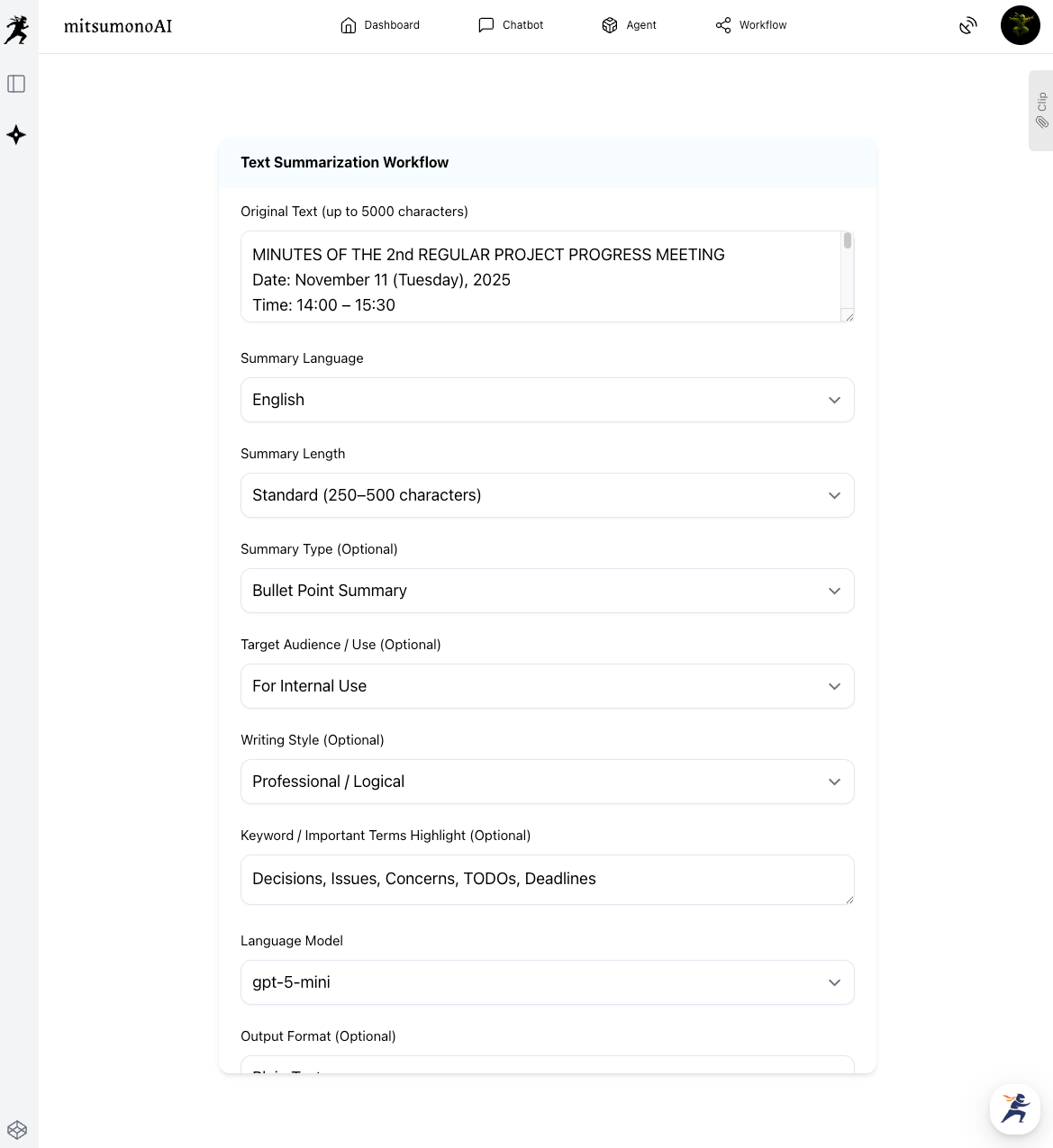

This step automatically extracts only the essential information—like "Who" needs to do "What" by "When"—from long emails for instant sharing with your team.
Step 2: [Files] Summarize Entire Meeting Minutes and Reports with File Analysis Assistant PRO
This method efficiently processes longer documents shared in PDF or Word formats.
[Preparation & Execution]
Launch File Analysis Assistant PRO and upload the file you want to summarize. Then, use the chat to give instructions.
"Extract the key points based on the following three criteria and summarize them in bullet points:
1.Decisions made
2.Future issues/concerns
3.Specific TODO lists for each member"

You don't even need to open the file and read it all. Through dialogue with the AI, you can pinpoint exactly the information you need, even from documents spanning dozens of pages.
Step 3: [Ultra-Fast] Quickly Organize Notes and Tasks with AI Chat
This is the method for organizing fragmented notes taken during meetings or the tasks swimming in your head in real-time.
[Preparation & Execution]
Launch a lightweight, high-speed AI chat like GPT-5-nano or Claude Haiku 4.5 and drop in your notes as they are.
"(Paste notes taken during a meeting)
Based on the notes above, please reorder my TODO list by priority and create a concise bulleted list."

This step allows you to convert messy information into an actionable task list without interrupting your flow of thought, enabling a smooth transition to your next action.
Moving from "Summarization" to "Creation"
AI summarization is more than just a time-saver.
- Automated Reporting:
By adding an instruction like "Create a draft report email to the Director based on this summary," you can streamline the entire reporting process. - Integrated Analysis of Multiple Documents:
Have the AI summarize multiple market research reports and then instruct it to "Integrate these results and provide three insights regarding future market trends" to automatically generate high-level analysis reports. - Content Repurposing:
Have the AI summarize transcripts of past seminars and use that content to create social media posts or blog articles, generating multiple pieces of content from a single information asset.
Summary
This article introduced three specific steps for using AI to dramatically improve the efficiency of daily information processing and turn "reading time" into "thinking time."
- Use the Text Summarization Workflow for emails and chats.
- Use File Analysis Assistant PRO for PDF and Word files.
- Use AI Chat for your own notes and thoughts.
By using the right tool for the right situation, you can stay ahead in this age of information overload. AI is your most talented "dedicated research assistant," reading through massive amounts of information on your behalf and delivering only the essence needed for decision-making.
Why not free yourself from "reading-only" time and tackle more creative, high-value work with AI?
mitsumonoAI is a specialized AI platform designed to improve both the quality and speed of business operations.
Beyond information gathering and summarization, it can be used to solve various business challenges, improve efficiency, and create new value for your company.