
Automatically Generate Blog Featured Images with AI | A Time-Saving Strategy to Free You from Stock Photo Hunting and Costs
Stop stressing over image hunting. This article reveals how AI instantly generates the perfect featured image just by pasting your blog's intro. Cut costs, save time, and elevate your content quality with this new standard.


The Dilemma of Searching for Featured Images
Just as you finish writing a blog post you put your heart into, right before you hit the "Publish" button. The final, and most frustrating, wall stands before you. That is the "Featured Image." You type keywords into the Adobe Stock search bar and sigh at the endless scroll of images. Before you know it, 30 minutes have passed, slowly eating away at the time you should be spending on your next project or research. On the other hand, if you compromise with free stock materials, you end up with generic images you've seen somewhere before, diluting the uniqueness of the article you worked so hard on. This dilemma of "Time," "Quality," and "Cost" is a challenge that pierces deeper the more you care about content quality, isn't it?
Limitations of Traditional Methods:
- Time Cost: Searching for that one photo that fits the article's theme among the vast library on paid sites like Adobe Stock takes over 30 minutes before you realize it.
- Financial Cost: Demanding high-quality images incurs a cost of several thousand yen per image. This squeezes your monthly budget.
- Compromise on Quality: Searching on free stock sites results in cliché images, damaging the article's originality and brand image.
Ideally, you should be spending more time on the content itself. By reading this article, you will learn a concrete method to use AI to completely free yourself from this unproductive time and cost of image searching, allowing you to concentrate on more creative tasks.
mitsumonoAI Becomes Your Blog's Exclusive Designer
The latest image generation function equipped in mitsumonoAI is no longer just a simple illustration tool. It is your blog's exclusive graphic designer that deeply understands the content of your article and instantly creates the most appropriate visuals for that context.
Feature 1: [Zero Thinking Time] Intuitiveness That Turns Your "Words" Directly into "Pictures"
The decisive difference from general image generation AI is that you don't need to learn "technical terms (prompts)" for the AI. Normally, to get high-quality images with AI, humans had to think up and experiment with specialized instructions (e.g., "photo realistic, cinematic lighting..."). However, since mitsumonoAI has optimal prompts designed behind the scenes, you simply need to convey "what kind of image you want" in natural language. This mechanism is why you can paste the article's lead text exactly as it is. This removes the barrier of specialized knowledge, offering a completely new experience that directly visualizes your thoughts.
Feature 2: [Don't Stop the Creative Rhythm] Overwhelming Speed That Doesn't Interrupt Your Thought Process
The moment you think, "Okay, time to find an image..." and stand up, your concentration on writing breaks. You will be completely freed from this stress that every content creator experiences. Image selection, which used to take tens of minutes, is now completed in just tens of seconds. You can run through everything from writing to image selection to publishing in one go without stopping your flow of thought, before the freshness of your ideas fades. There is no longer any need to interrupt your creative rhythm to search for images.
Feature 3: [Enhance Brand Value] One-of-a-Kind High-Quality Original Images
"I've seen this somewhere before" free stock photos can sometimes damage the value of your article or brand. What mitsumonoAI produces are unique visuals created solely for your message—the only ones in the world. Use high-definition "Photos" for articles where you want to convey trust, or "Illustrations" when you want to explain complex themes clearly. With diverse styles, it generates high-quality images that perfectly match the tone of your article, enhancing the persuasiveness of the entire content and your brand image. By leveraging this function, it is possible to dramatically improve the speed of content production without compromising the quality of your featured images.
Step-by-Step Guide: The Full Procedure to Generate Featured Images with AI from Blog Openers
The operation is surprisingly simple. It is completed in just 3 steps.
Step 1: Copy the article's opening text (lead text)
First, copy the opening part of your finished blog post—the lead text, which is most important for grabbing the reader's attention. This text becomes the most critical instruction (prompt) for the AI to generate the image.
Turning "Non-Wedding Days" into Revenue Streams
With declining birthrates and diversifying wedding styles, many venues face the challenge of low occupancy during weekdays and the off-season. While weekends remain active, valuable assets—both facilities and staff—often sit idle during the week. In this article, we explore how to solve this issue. Using a fictional venue as a case study, we demonstrate how to leverage the "New Business Development Assistant" to design innovative business models that generate revenue even on days without weddings.
The text copied here acts as the "communication of the concept" to the AI itself. The challenge of "how to utilize days without weddings," the solution of "new revenue models," and the setting of "bridal facilities." Because the lead text condenses these elements, the AI can deeply understand the theme of the entire article.
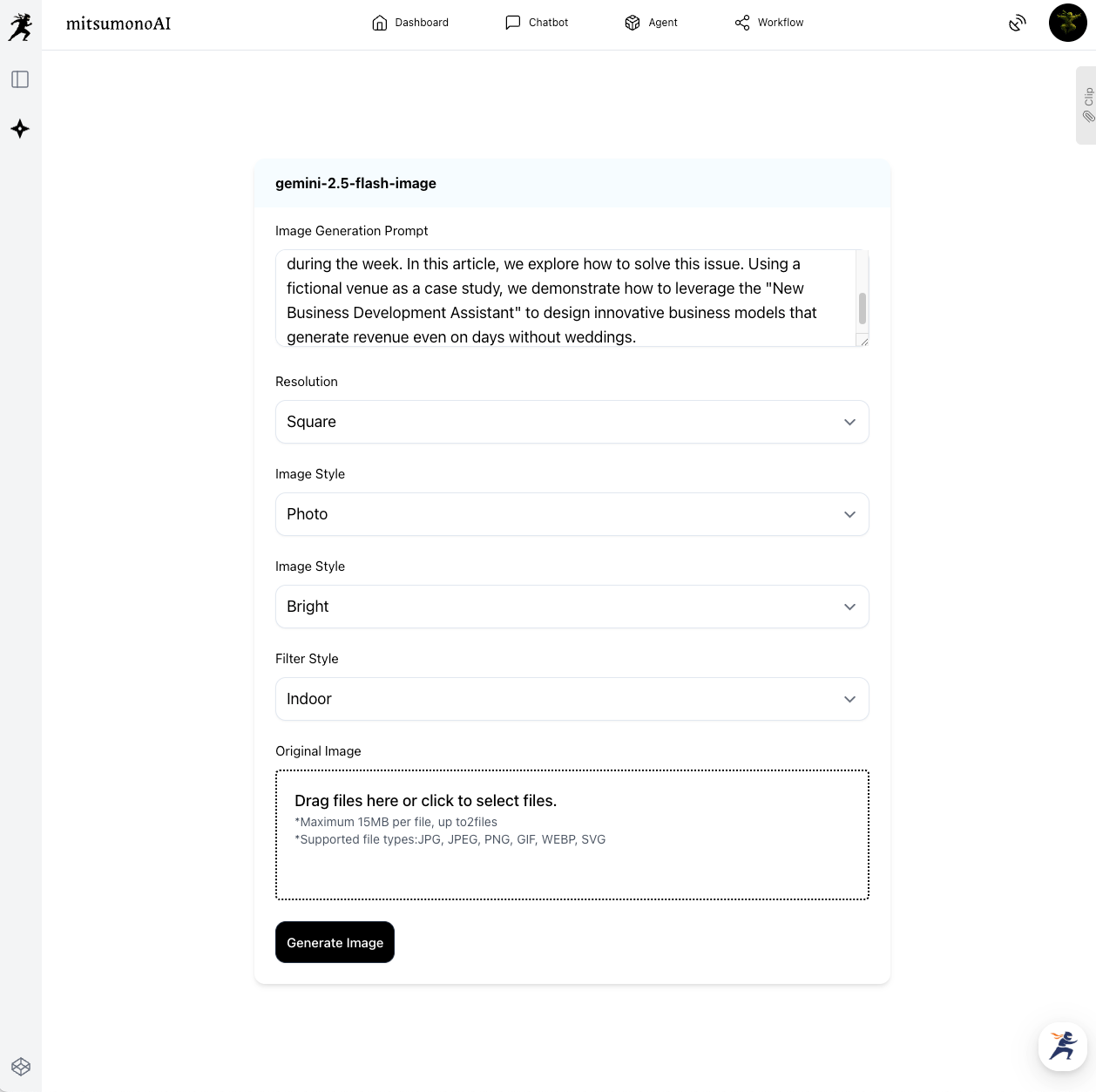
Step 2: Paste into "gemini-2.5-flash-image" and select a style
Launch "gemini-2.5-flash-image" from the mitsumonoAI workflow. Paste the text you just copied into "Image Generation Text." Since we want to express the facility's high-quality and calm atmosphere this time, we selected "Photo" from "Image Style" and "Bright" from "Image Mood." With just this, the AI grasps the concrete image of "a photo of a bright facility on a day without weddings" and begins preparation for generation.
Step 3: Select and download the generated image
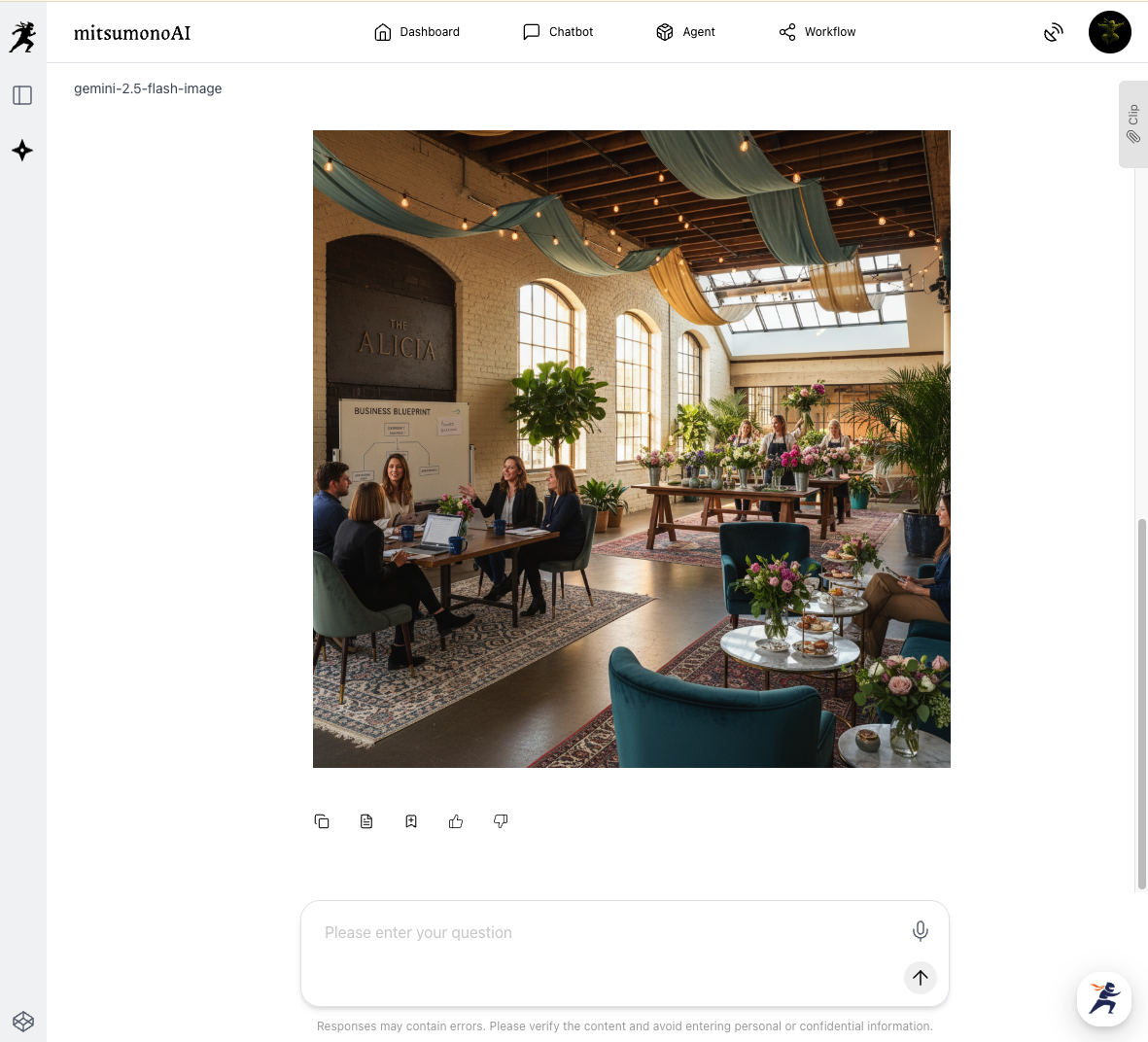
Click the "Generate Image" button, and the AI will present images in a short time. The AI perfectly understood our intent and proposed multiple high-quality images. It is a visual with a story, showing a high-quality hall being utilized as a cafe, making you feel the "new possibilities for days without weddings."
✅ Checklist: Completion of the Optimal Featured Image
- Does the generated image match the article's theme and content?
- Does the tone of the image (bright, calm, etc.) match the brand image?
- Is there enough space secured to place text (such as the title) you want to display within the image?
- [Success Indicator] The time spent selecting featured images has been reduced to an average of less than 5 minutes per article.
Application & Expansion: Utilizing for SNS Posts and Presentation Materials
This function is not limited to creating featured images.
- Image creation for SNS posts: By pasting the post text for X (formerly Twitter) or Facebook announcing a blog update, you can instantly create an image linked to the post content.
- Illustrations for presentation materials: By inputting the summary text of each slide, you can easily generate graph images or illustrations that reinforce the content, enhancing the visual quality of your materials.
- Main visuals for websites: You can input corporate catchphrases or philosophies and utilize it for brainstorming ideas for the main visual that serves as the face of your website.
Summary
Searching for featured images is an "invisible cost" in content production. By utilizing mitsumonoAI's image generation function, you can dramatically reduce both this time and expense.
- Just by pasting the blog's opening text, you get the optimal image.
- The time spent hunting for materials disappears, allowing you to focus on writing and planning articles.
- You gain unlimited access to high-quality, unique images without worrying about costs.
There is no longer a need to rely on cliché free stock materials. Let's further elevate the value of your content together with AI, your exclusive designer.



