Restoring the Reputation of Your "Useless Bot" | How to Build "AI Knowledge" that Automatically Generates Smart Answers
Struggling with a chatbot that doesn't help? A bot’s performance isn't just about its engine—it’s about the quality of its "knowledge." Learn how to use mitsumonoAI to efficiently create and structure accurate, consistent Q&A data to turn your bot into a smart, reliable asset.


Is your chatbot being called "useless" behind its back?
For those in charge of customer support or internal help desks: Are you facing these "disappointments" with the chatbot you introduced to improve efficiency?
- "No matter how I ask, it just says, 'I'm sorry, I don't quite understand.'"
- "The answers are mechanical and cold, which eventually leads to complaints and more work for human staff."
- "Manuals vary by department, so I don't know what the bot should even learn."
Many companies mistakenly believe that simply adopting a high-performance chatbot tool will solve everything. However, no matter how great the engine is, a bot cannot give correct answers if its "knowledge" is empty or unorganized.
Leaving an inaccurate bot as it is gives customers the impression that "this company doesn't listen," risking a sudden loss of brand trust. Do you want to escape the backwards situation where humans spend countless hours manually creating Excel Q&A lists just to make the bot smarter?
Graduate from "Set It and Forget It." Move into an Era where AI Automatically Builds the "Perfect Textbook."
The approach I want to propose is using "mitsumonoAI" to build the "brain (knowledge base)" of your chatbot with the highest possible quality.
mitsumonoAI is not the chatbot itself (the implementation tool). Instead, it is a "knowledge manufacturing factory" that allows anyone to easily create content assets equipped with the "Structure," "Context," and "Consistency" necessary for a bot to behave intelligently.
Strengths of using mitsumonoAI:
- Automated "Structuring" for AI readability:
Instantly converts and structures long, hard-to-read manuals into a "Q&A format" that is easy for bots to learn. - Installing "Context":
By defining your company's mission and tone & manner, any bot can provide a consistent response that feels "true to your brand." - Supplementing Expert Knowledge:
Even if you lack internal expertise, you can borrow the knowledge of an expert AI (Sensei AI) to create knowledge grounded in actual practice.
This allows frontline staff—not just engineers—to become the "teachers" of a beloved bot with high answer accuracy.
In Practice | Building the Brain of a "Beloved Bot" in Just 3 Steps
Let’s look at how to create a "textbook for a smart bot," using the improvement of an accommodation facility's FAQ chatbot as an example.
Step 1 (The Foundation): Define the Bot's "Personality" and "Knowledge"
First, solidify who the bot should answer to and what attitude it should take (Context). If the bot's character setting is inconsistent, the reliability of its answers will falter.
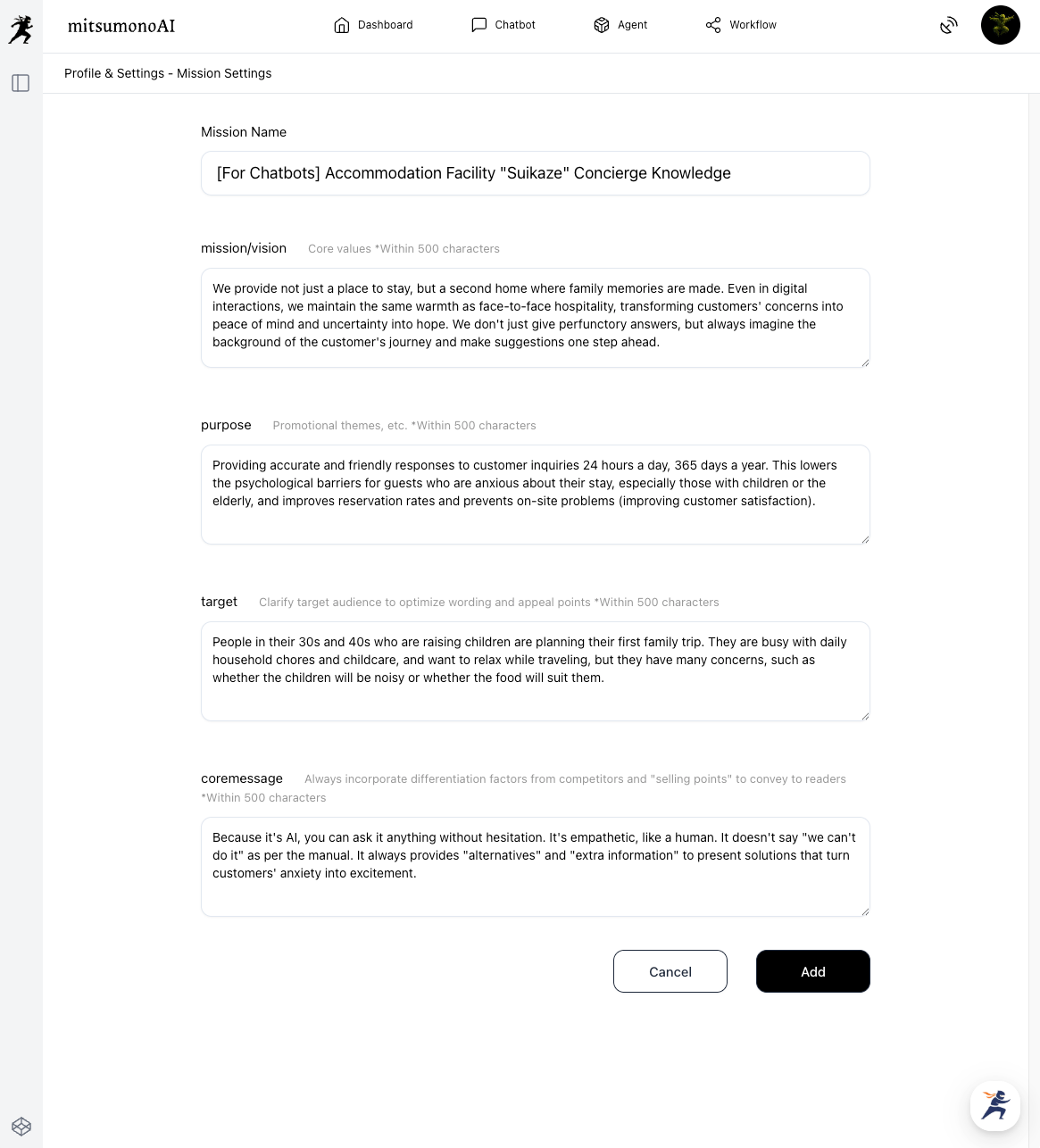
1-1. Mission Registration and Persona Creation:
Mission:
Register it as a "concierge providing the ultimate relaxation to guests." This ensures a warm tone, such as "Please travel safely," rather than dry, robotic responses.
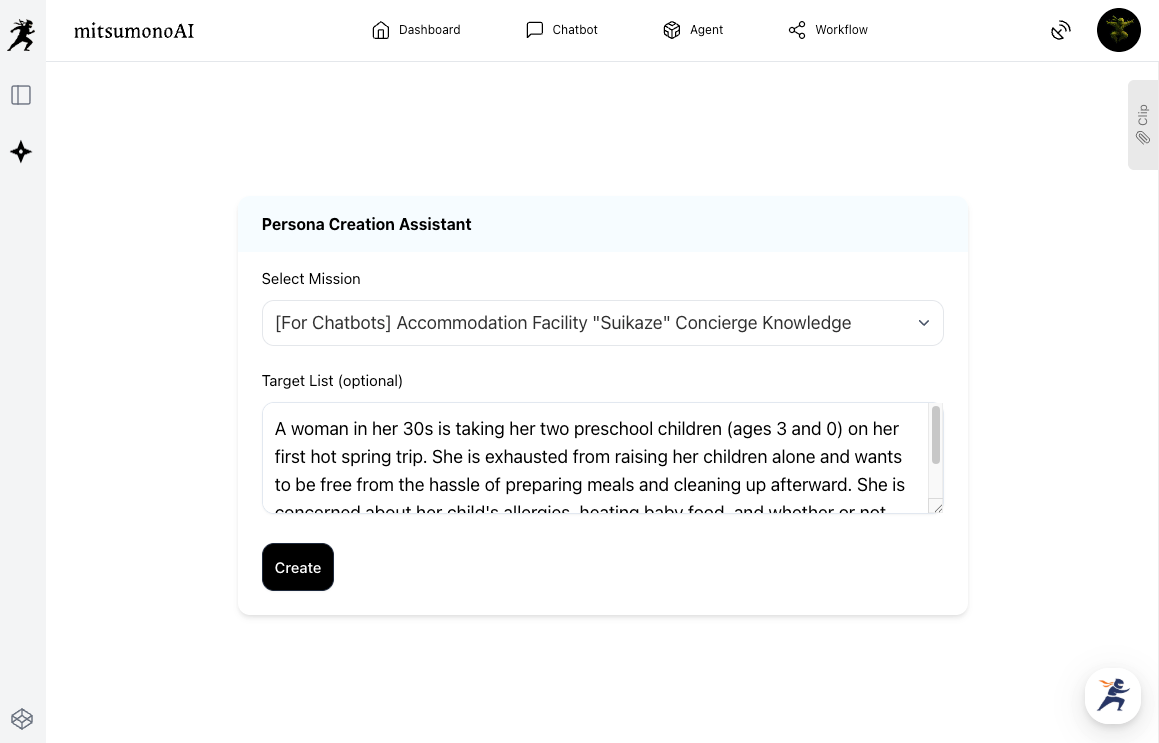
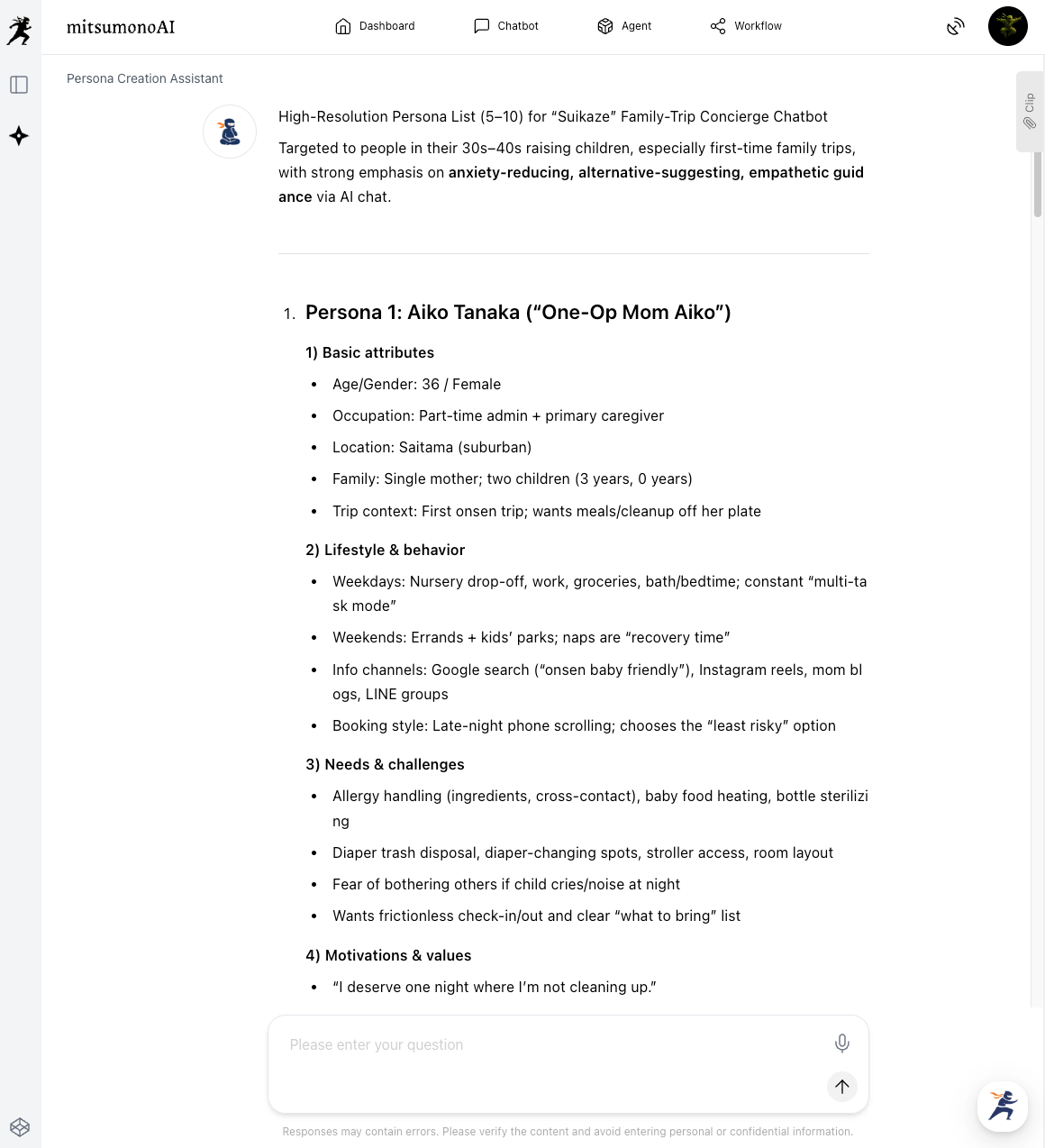
Persona Creation Assistant:
Set a persona like "travelers with small children" and identify the anxieties they often have (food allergies, co-sleeping, etc.).
💡 Pro-tip:
The more detail you put into the target list, the better the AI can imagine realistic and serious "pain points"—like "I'm worried about my baby crying at night; are there any corner rooms available?"—which improves the quality of the Q&A knowledge designed to resolve them.
1-2. Supplementing Expertise with Sensei AI:
Consult with "Sensei AI - Accommodation" about off-season attraction strategies or handling common troubles. Use the advice obtained from a professional perspective as a reference for the bot's response scenarios.
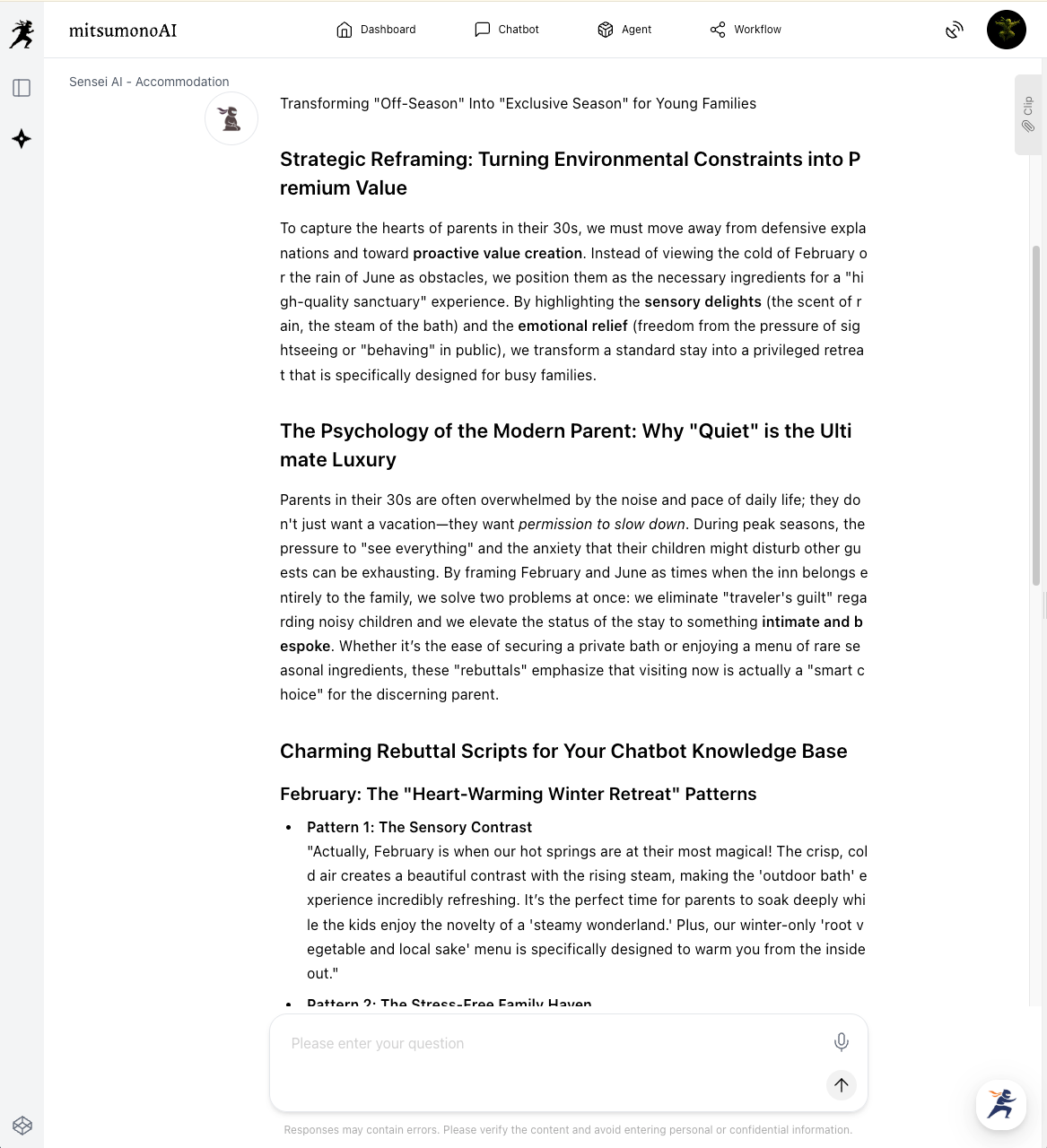
Prompt Example A: Making the Off-Season Attractive (Boosting conversion rates)
Goal:
For inquiries like "Is it fun to visit at this time of year?", obtain knowledge that converts negative elements (cold, nothing to do) into positive values (tranquility, seasonal cuisine).
For the 'off-season' months of February (extreme cold) and June (rainy season), please create charming 'rebuttal' talk scripts for when guests ask, 'Is it fun to visit during this time?'
Conditions:
・Avoid simply saying 'it's not crowded.' Instead, frame it as added value, like 'having the silence all to yourself' or 'ingredients only available now.'
・Include benefits that appeal to the target 'parents in their 30s' (e.g., you don't have to worry if the kids are loud, private baths are easy to book).
・Provide 3 patterns each for February and June."
Prompt Example B: Initial Trouble/Complaint Handling (Improving Customer Satisfaction)
Goal:
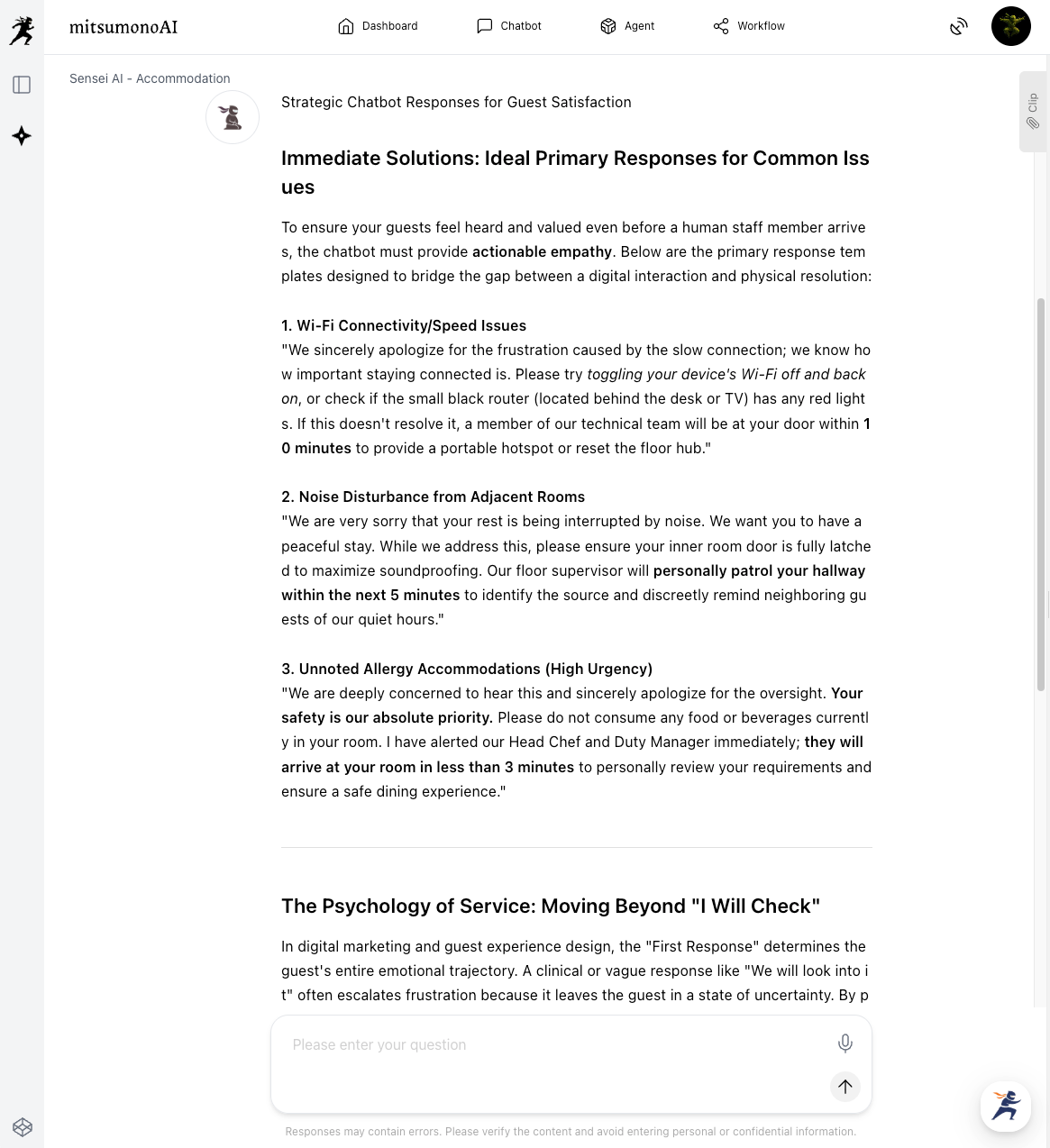
When a guest sends a complaint via chat (slow Wi-Fi, noisy neighbors, etc.), create an "initial response" template that calms the guest and maintains trust until a human staff member takes over.
Situations:
・'Wi-Fi won't connect / is slow'
・'Noise or footsteps from the next room are loud'
・'I requested allergy accommodations, but it seems they weren't noted' (High Urgency)
Points for the response:
・Even for an AI bot, start by stating empathy and an apology for the inconvenience.
・Don't just end with 'I will check.' Include steps the guest can take on the spot (like router location) or an estimated time for a staff member to arrive.
・Keep the tone calm and polite, without becoming too clinical."
Prompt Example C: Pre-empting "Hidden Anxieties" (Boosting Satisfaction)
Goal:
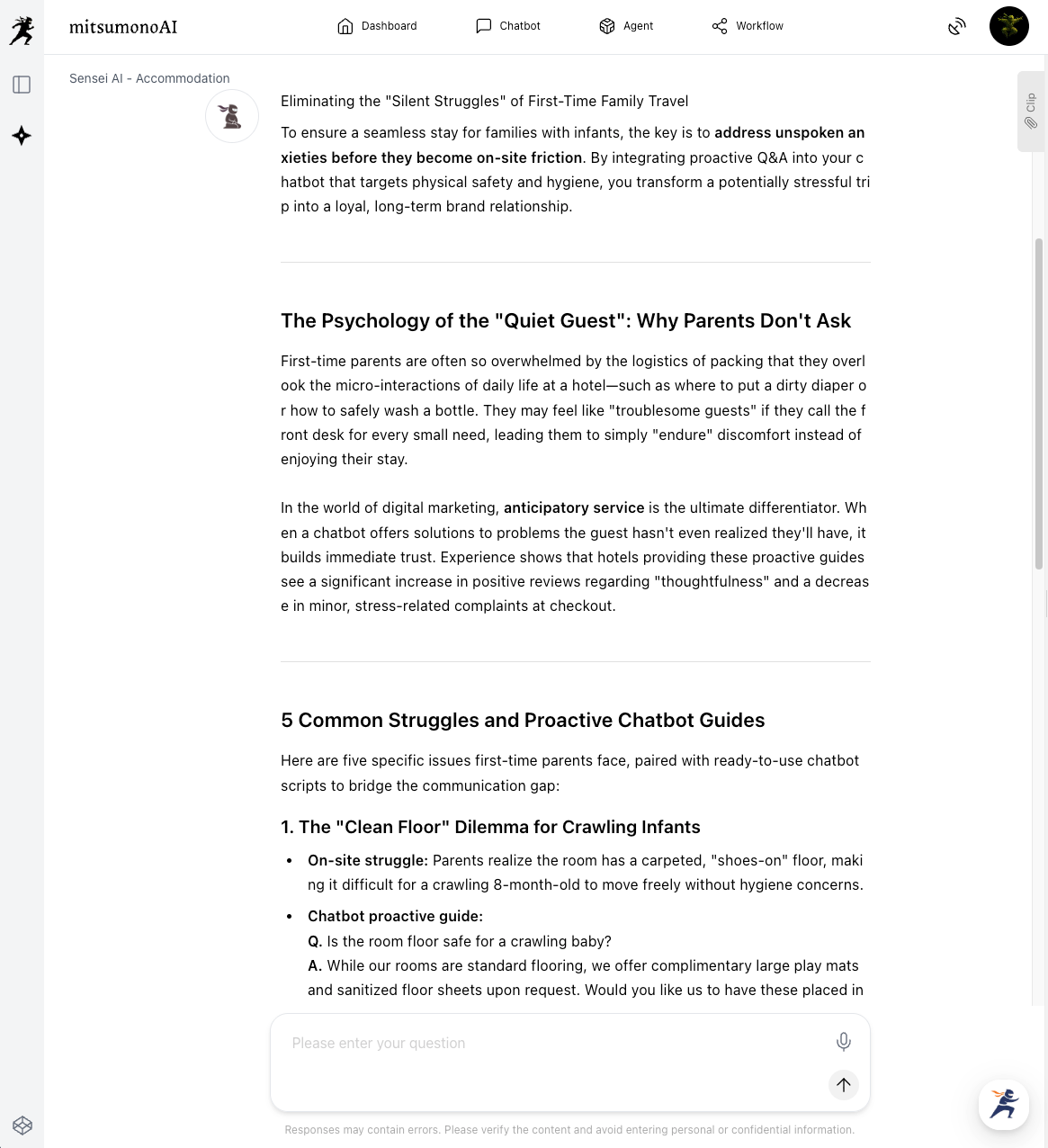
Use professional insight to identify "latent anxieties" that guests themselves might not verbalize, and add them to the FAQ list.
Example:
・On-site struggle: Anxious about asking to heat up baby food, so they serve it cold.
・Chatbot proactive guide: Q. Can I bring baby food? A. Yes, you are welcome to. Our staff is available 24 hours a day to heat it up for you; please just let us know from your room."
Step 2 (Content Generation): Structuring the Manual into "Q&A"
Next, convert your scattered documents into a "structure" the bot can use for instant answers. This is usually the most time-consuming part, but with AI, it happens in a flash.
File Analysis Assistant PRO:
Upload past inquiry logs (Excel or CSV) and have it extract "hidden issues that customers often ask about but are not in the manual."
Result: You discover "blind spot" needs, such as "how to get to the nearest convenience store," and add them to your knowledge base.
Step 3 (Dialogue & Deep Dive): Using Prompts to Increase Accuracy
Finally, polish the generated knowledge using the chat function. Elevate it from a mere Q&A list into "empathetic responses."
"Based on the 'common questions from parents' extracted earlier, please create 5 Q&A entries for the chatbot. Conditions:
・Assume the questioner is a 'mother feeling anxious.'
・Start the answer with the conclusion, then add a reassuring word (empathy).
・Format the output as Q: [Question] / A: [Answer]."
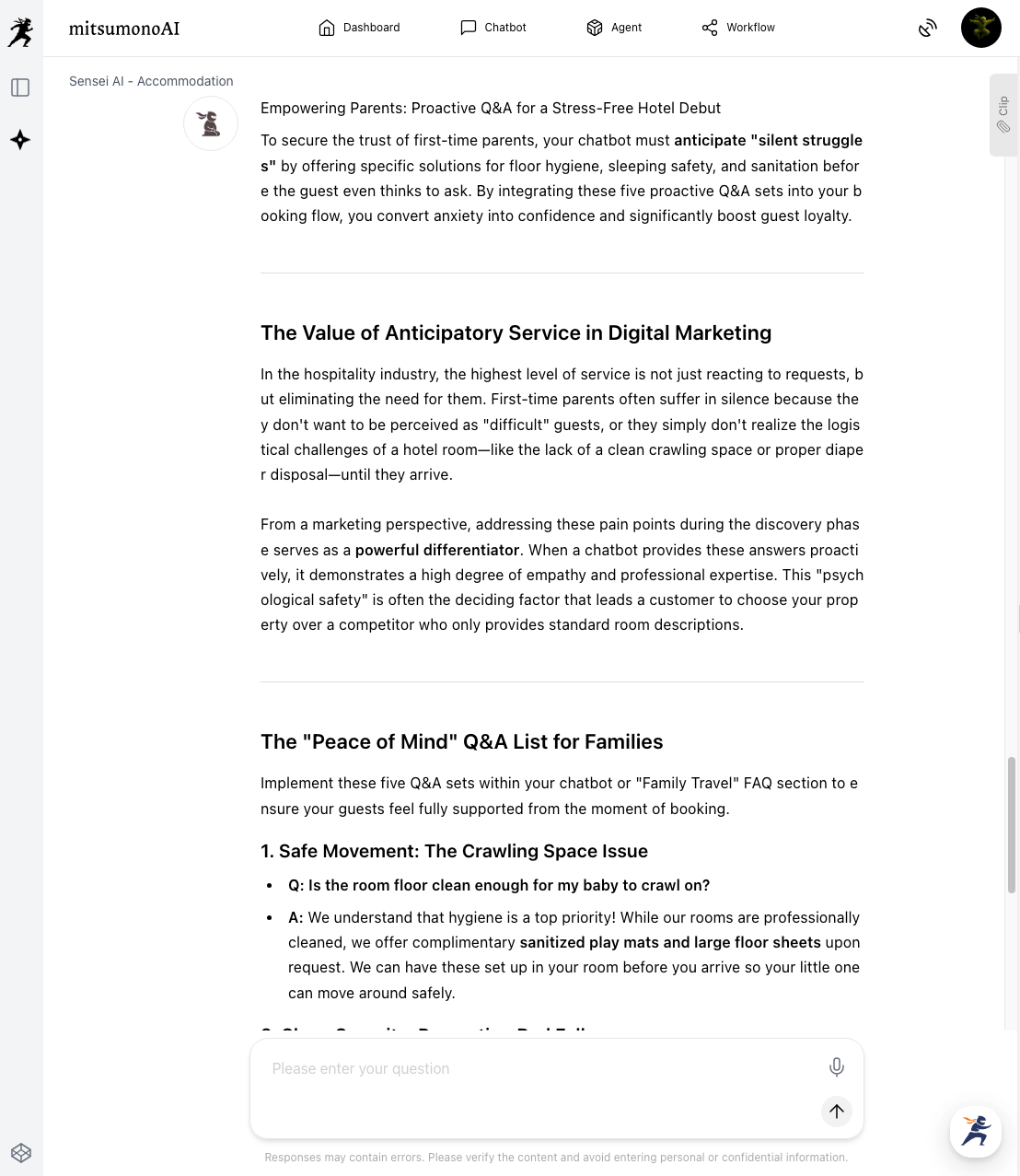
Save these to the "Clip feature" and register them as the bot's learning data. Using the Clip feature makes it easy to manage and update knowledge even if the person in charge changes.
From Internal Inquiries to Sales Support: Turning Every "Question" into an "Instant Answer"
This "knowledge construction model" can be applied widely beyond customer support.
- Internal Help Desks (General Affairs, HR, Accounting)
- Idea: Use the summary workflow to turn complex "work rules" or "expense regulations" into a "one-question, one-answer" format.
- Effect: Reduces time spent responding to routine questions like "How do I submit a receipt?" to zero, allowing staff to focus on core tasks.
- BtoB Sales & Technical Support
- Idea: Analyze massive "product specification (PDF)" files to automatically generate Q&A lists for specs.
- Effect: Even a new sales rep can provide technical answers instantly with the same accuracy as a veteran.
- Education & Training
- Idea: Create quiz-style knowledge bases from "operational manuals."
- Effect: Evolves the bot into a tool where new hires can train their business knowledge.
Summary: Maximize Customer Satisfaction by Reducing "Teaching Effort" to Zero
The key to a successful chatbot is not the tool's performance, but the "quality and freshness of the knowledge" stored within it.
By using mitsumonoAI, you can dramatically streamline the massive preparation work—reading manuals, creating Q&A, and unifying the tone—that humans used to do by hand. This process is essentially giving your bot a "high-quality textbook" and raising it to be a top student.
Turn your company's chatbot from "useless" into a "reliable partner." Experience the speed and accuracy of high-quality knowledge creation with mitsumonoAI.
mitsumonoAI is not only for building chatbot knowledge; it can be used to solve various challenges in your business, improve efficiency, and create new value.
For more use cases and the latest information, visit the mitsumonoAI blog site.