Spin Agent Utilization Guide for Maximizing SaaS Win Rates : Procedures for Efficient Discovery Design
AI automatically generates "SPIN Selling" scripts, essential for IT and SaaS sales. This guide explains how to use "Spin Agent" to create high-quality discovery sheets that uncover latent customer issues simply by entering product URLs and key features.


In the IT industry, particularly within SaaS businesses, the success of a deal is determined not by "feature explanations" but by "high-quality discovery." However, designing questions that uncover a customer’s latent challenges requires significant preparation time and high-level skill.
This article explains the workflow for using "Spin Agent," a tool that automatically generates the "SPIN Selling" framework to create professional discovery sheets in a short amount of time.
By reading this article, you will be able to:
- Verbalize "high-impact questions" tailored to your product's specific characteristics.
- Standardize sales skills (Sales Enablement) across your organization.
Note: For a basic overview of Spin Agent, please refer here.
 mitsumonoAI
[STEP 1] Inputting into Spin Agent: Defining Product and Target
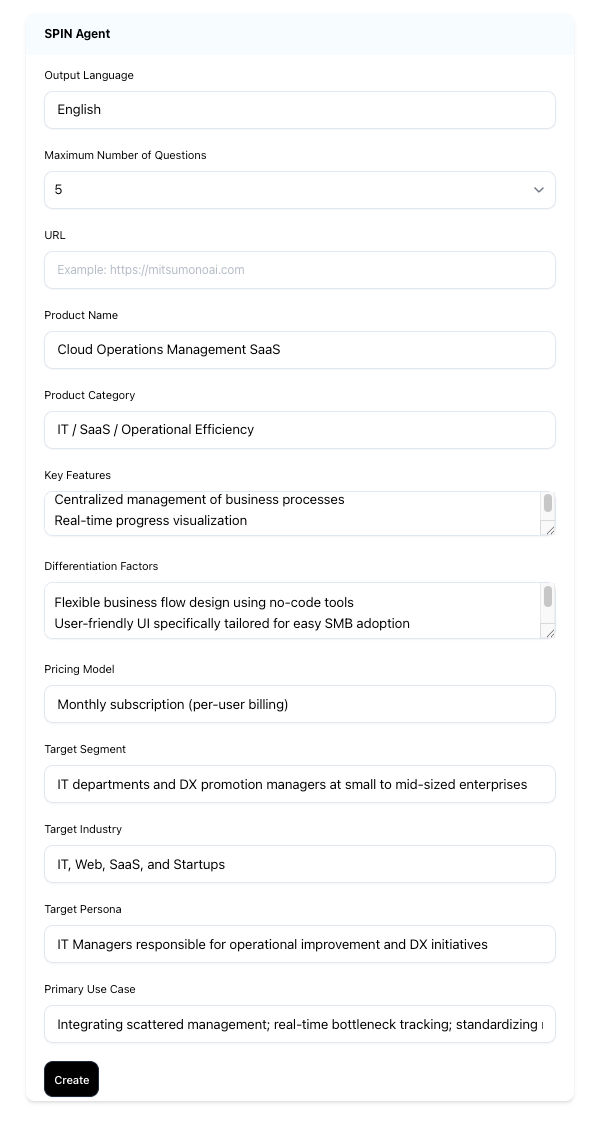
The first step is to enter information about your product and target audience to create the "instructions" the AI needs to generate questions.
The Role of Spin Agent
Based on your SaaS features and differentiators, this tool automatically outputs a "designed set of questions" to deep-dive into customer issues. It saves sales reps the trouble of brainstorming questions from scratch, as the AI constructs a logical SPIN structure (Situation, Problem, Implication, Need-payoff).
"The core of Spin Agent lies in its 'Diagnostic Power.'"
Salespeople should not be "medicine peddlers" but "doctors" who identify the root cause. The key to the AI creating sharp questions is how specifically you can imagine the "dire future" the customer faces if they leave their problems unaddressed (Negative Impact).
① Input Categories and Key Points
The tool’s input fields are designed to link your product's "strengths" with the customer's "pain."
| Field Name | Specific Content to Include | Tips for Increasing Accuracy |
| URL | Your company website URL. | Most Important. Entering this automatically generates drafts for other fields. |
| Product Category | E.g., "IT/SaaS," "Manufacturing." | Avoid overly broad terms. Narrow the focus, such as "Accounting SaaS for Mid-sized Firms." |
| Differentiators | Strengths not found in competitors. | Focus on "Comprehensive Post-Implementation Support" or elements that provide peace of mind rather than just "Price." |
| Target Persona | Decision-makers vs. End-users. | "Pain" varies by role. Be specific, down to the job title. |
| Main Use Cases | Moments when customers feel "troubled." | Describe concrete scenes, such as "Frequent errors occurring because Excel management has reached its limit." |
② When Information is Difficult to Prepare
To match the fast pace of IT sales, flexible input options are available:
- URL only (or partial fields):
The AI will supplement the context to generate questions even with limited data. - Leveraging existing materials:
Simply copy and paste text from company slide decks or manuals to complete your preparation.
[STEP 2] Interpreting Results: Mastering the "Questions" That Lead the Meeting
What is generated after inputting information is not just a list of questions. It is an output closer to a "Sales Playbook" designed to control the flow of the negotiation.
① Four-Stage Question Proposals Based on the SPIN Structure
Spin Agent does not just list questions randomly; it generates them according to the psychological phases that make a customer "want to take action."
Situation | Grasping the Status Quo
Questions to confirm current management tools or manual data entry workloads.
- Goal: Correcting your understanding of the customer's current environment and systems.
- Example: "Are you currently managing progress via Excel?" "How many people are involved in the data entry process?"
Problem | Surfacing Dissatisfaction
Surfacing specific drawbacks caused by fragmented management, such as "delays in progress tracking" or "rework costs."
- Goal: Having the customer verbalize the "usability issues" or "inefficiencies" they vaguely feel.
- Example: "Does the time required for data aggregation become a burden during meeting preparation?"
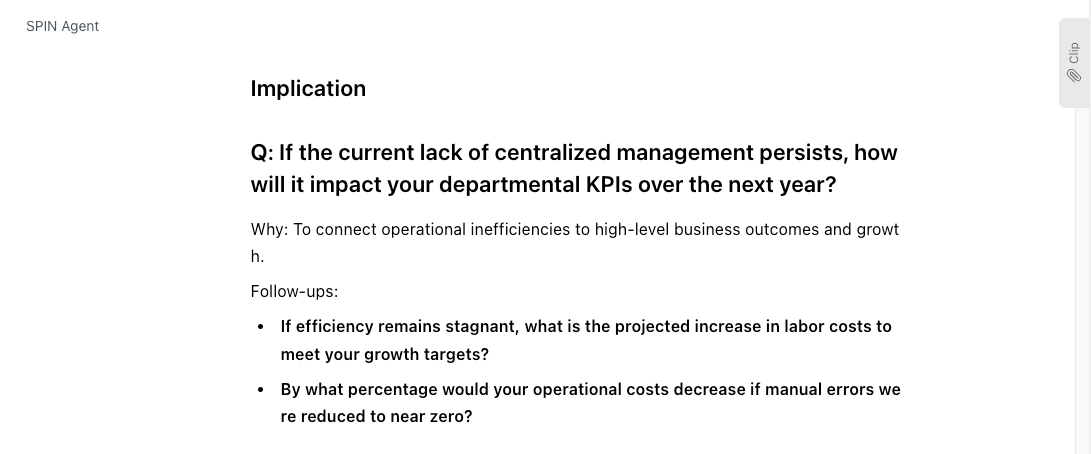
Implication | Recognizing the Risk of Inaction
Making the customer realize the risks of leaving the problem as is, such as "delayed management decisions" or "decreased ROI."
- Goal: Getting them to acknowledge how much loss (cost increases or missed opportunities) today's problem will lead to in the future.
- Example: "Is there a risk that delayed decisions due to calculation errors could lead to delivery delays for the entire project?"
Need-Payoff | Visualizing the Ideal State
Visualizing the post-implementation success, such as "how much faster operations would be if field improvements could be made via no-code."
- Goal: Having the customer describe the "positive future" in their own words once the problem is solved.
- Example: "If progress could be visualized in real-time, how much do you think management costs could be reduced?"
② Utilizing "Why (Intent)" and "Follow-ups"
The most distinctive feature of Spin Agent is the explanation behind the questions.
- Why (Question Intent):
Understand which specific customer challenge (e.g., frustration with lack of flexibility in the field) you should explore through that question. - Follow-ups:
A set of secondary questions to draw out "specific numbers" or "past examples" if the customer's response is too abstract.
③ Practical Application
Beyond just using the results as-is, you can further enhance the quality of your meetings:
- Reduced Prep Time:
Preparation is finished by simply replacing the generated questions with customer-specific keywords (e.g., the name of their existing system). - Closing Design:
Use the "Next Action Candidates" (e.g., ROI calculation proposal, demo execution) provided at the end of the output to set your meeting goals in advance.
Summary
The workflow using Spin Agent is very simple:
- Enter the product URL and features (STEP 1: Input).
- Review the generated SPIN questions and follow-up items (STEP 2: Output).
- Adjust the tone to match the customer's culture and use them in the field.
In the IT and SaaS industry, achieving "high-quality discovery in a short time at low cost" without relying on individual innate talent will raise the sales capabilities of the entire organization.
Start preparing for your next meeting by entering your product information (URL or features) today.
Click here for specific use cases for each industry.
 mitsumonoAI