
How to Increase Revenue by Developing a Pricing Strategy for Accommodation Plans
Utilize the Pricing Strategy Assistant to formulate optimal pricing and sales strategies based on competitor information and target audience needs, thereby maximizing revenue.


Tool Used
- Pricing Strategy Assistant
Pricing Strategy to Maximize Sales
The market is constantly fluctuating, competitor activity is fierce, and demand changes significantly depending on seasonal factors and the presence of events. Relying on experience or intuition for pricing decisions carries a high risk of lost opportunities. While a thorough market research and competitor analysis are important, collecting and analyzing vast amounts of data requires specialized knowledge and time, which is difficult to secure amidst daily operational demands.
The "Pricing Strategy Assistant" allows you to formulate a pricing strategy that proposes a unique value by investigating key competitor facilities simply by adding their URLs. Here, we introduce the steps to create a data-driven pricing strategy—one not solely based on intuition—to maximize the opportunities for customer acquisition and revenue.
Specific Steps
Step 1: Inputting Information into the Pricing Strategy Assistant
▶︎ Pricing Strategy Assistant
Follow the on-screen instructions to input the necessary information, and click "Create" to output the pricing strategy.
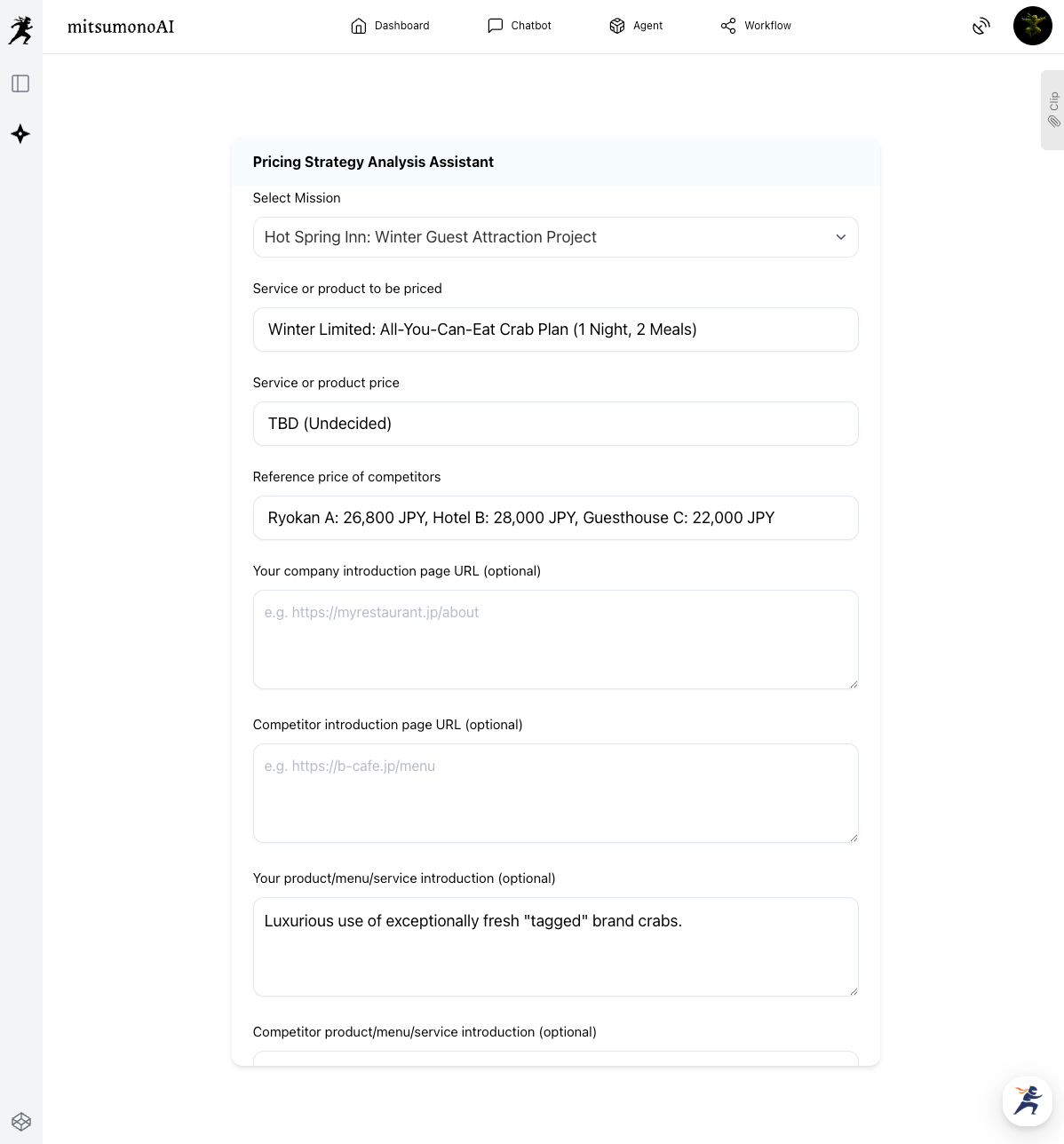
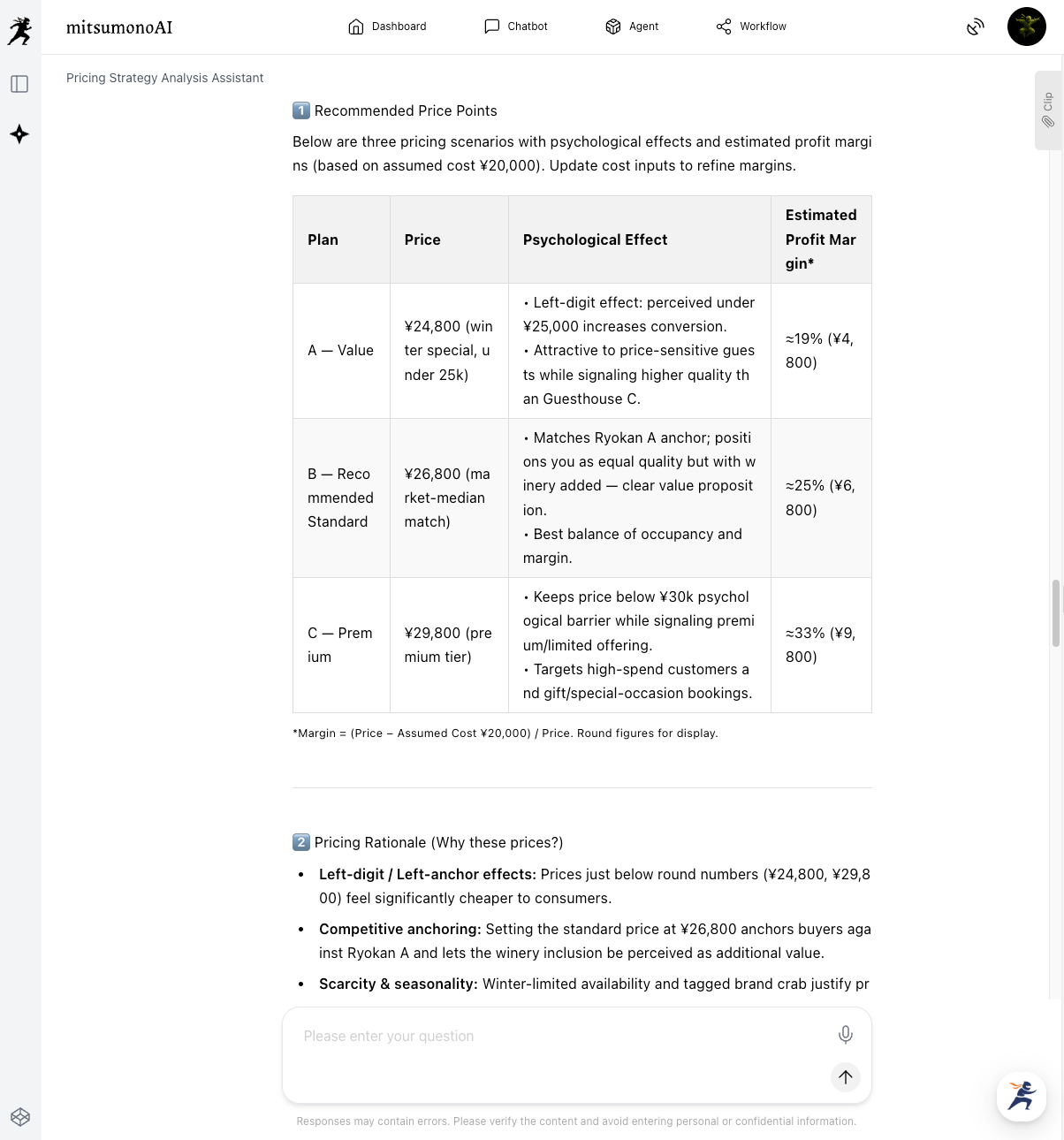
The AI will conduct a multi-faceted analysis of market conditions, the competitive environment, and the facility's characteristics to propose specific pricing strategies, including optimal price ranges, discount strategies, and promotional ideas.
Especially for "Service or Product Prices" that were initially "Undecided," information such as anticipated demand levels and behavior predictions for each price range will be useful.
Step 2: Evaluating the Proposed Pricing Strategy and Determining the Specific Price
▶︎ Pricing Strategy Assistant (Continued)
Review the proposal and determine the specific price range that best aligns with your business goals through a chat with the Pricing Strategy Assistant, referencing the following dialogue examples.
① Deepening the Proposal
Elicit more detailed information about the suggested price by asking questions like the following:
② Simulation at a Specific Price Range
Once the price range has been somewhat narrowed down, simulate competitor reactions and the impact of the price range on the customer segment. Consider whether the price is aimed at the existing target segment or at acquiring new customers.
③ Considering Constraints
There may be non-negotiable conditions for the accommodation facility, such as cost of goods sold (COGS) ratio or occupancy rate. By conveying such information, you can prompt a re-evaluation of the price range based on these constraints.
Through dialogue with the Pricing Strategy Assistant, you can examine the proposed information from multiple angles and derive the optimal price range and sales strategy for your goals, resources, and market environment. The finally agreed-upon pricing and strategy are then saved using the clip function, ready to be shared and discussed internally.
Step 3: Final Pricing Decision and Execution Plan
Based on the pricing and promotion strategy decided through dialogue with the Pricing Strategy Assistant, a concrete execution plan is formulated. Collaborate with the marketing and sales departments to reflect the decided price on booking sites and the official website, and launch campaigns.
After implementation, regularly monitor the set KGI and KPIs. If necessary, engage in dialogue with the assistant again to review and fine-tune the strategy based on market reaction and sales performance.
Expected Results and Goals (Reference Example)
By implementing this utilization method, companies can formulate objective and effective pricing strategies based on data, without relying on experience or intuition. By maximizing market opportunities and establishing a competitive advantage, it leads to improved profitability and a reduction in lost opportunities.
Furthermore, it reduces the burden on staff in charge of pricing decisions and shortens the time required for strategy formulation, improving operational efficiency. Creating a strategy that maximizes corporate revenue while offering customers a price they find reasonable ultimately contributes to maintaining and improving customer satisfaction, supporting sustainable business growth.
Target Metrics for the 6-Month Period
KGI (Key Goal Indicator):
- Sales for the Winter-Limited All-You-Can-Eat Crab Plan after 6 months: 20% increase compared to the previous year
KPI (Key Performance Indicators):
- Room occupancy rate during the winter season: 80% or higher
- Number of bookings for the Winter-Limited All-You-Can-Eat Crab Plan: Average 60 bookings or more per month
- Average rating on online accommodation booking sites: 4.3 points or higher (out of 5)



